Know how many providers you need, hour by hour.
QSimHealth runs a full year of patients through your emergency department, walk-in or urgent care clinic, or appointment office. Try a staffing plan and see the wait at every hour, and what it costs per day, before you set the schedule.
10 days free, no credit card. Runs in your browser on a phone, tablet or desktop.
Three questions your schedule can't answer.
“Should we add a provider at 6pm?”
Run your current staffing against one more provider from 4 to 10pm. See the wait by hour, not just the daily average.
“What if patient volume goes up 20%?”
Test today's staffing against higher demand. Find out where the queue breaks before your patients do.
“Should I add a PA instead of a second MD?”
Model MDs and PAs together. Weigh the change in wait against the change in cost, with the same arrivals.
Same patients, two staffing plans.
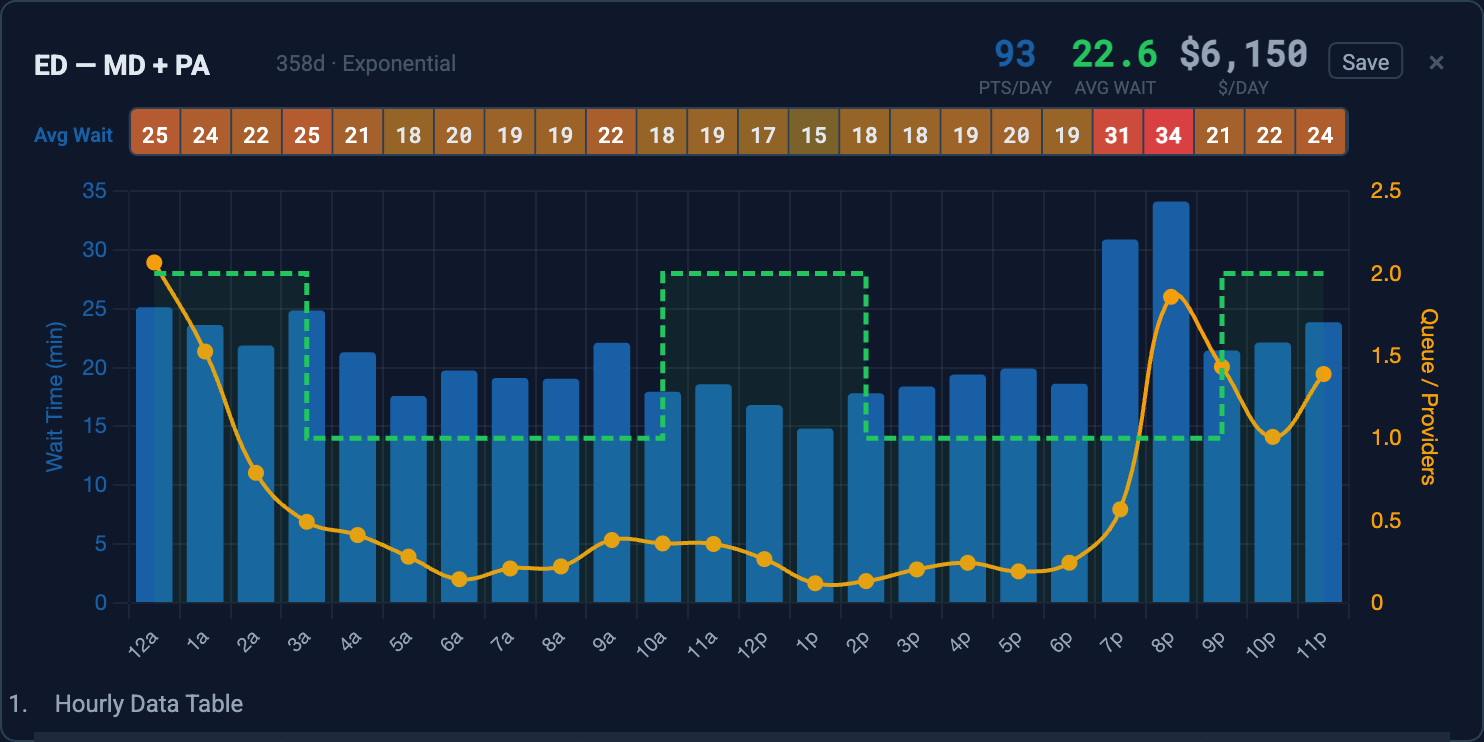
An ED runs on one MD and the wait climbs every evening. Plan B adds PA coverage at the busy hours. QSimHealth runs both plans against the same arrivals and treatment times, so the only difference is the staffing.
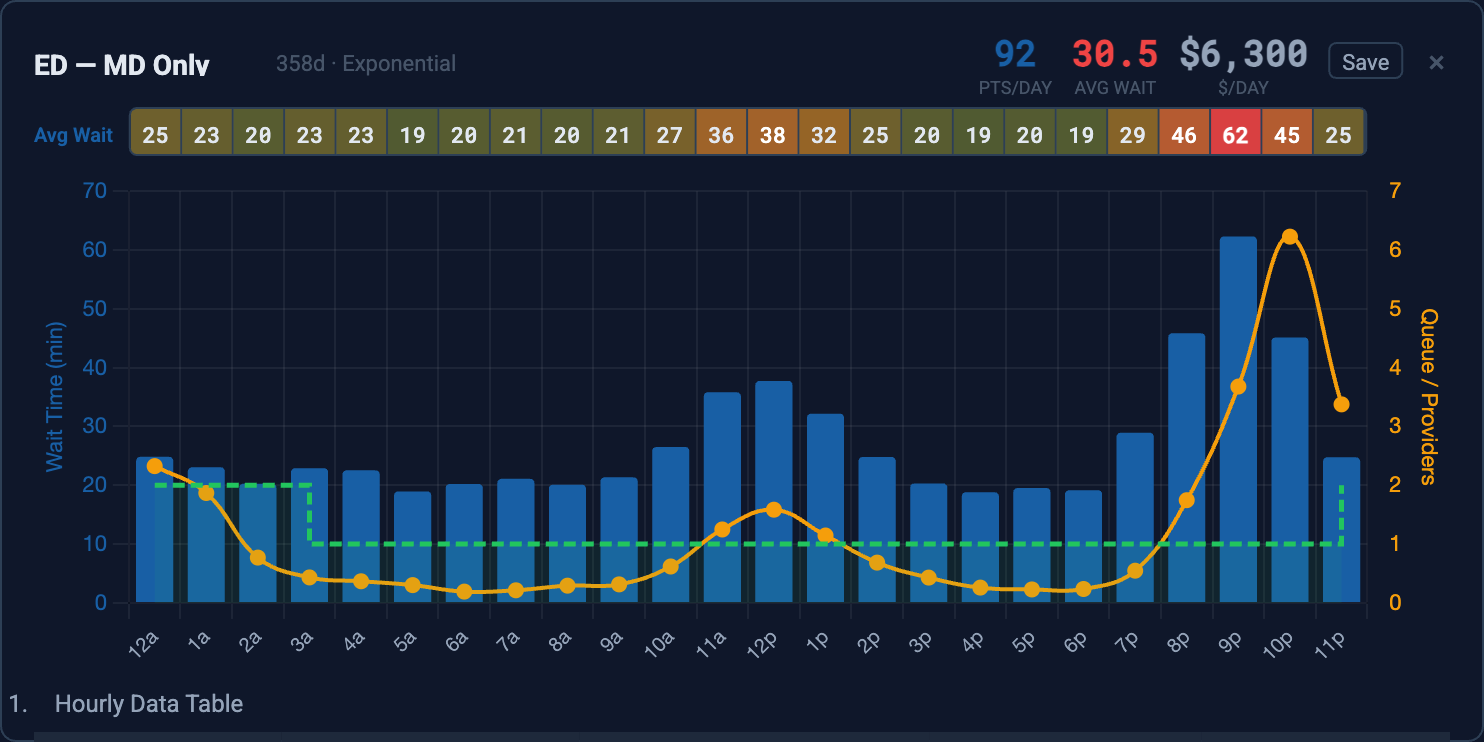
Each run covers a full year of arrivals and reports the result hour by hour.
“We thought we needed another provider for the evening rush. QSimHealth showed us that shifting one existing provider by two hours eliminated the wait time spike entirely. Same headcount, better coverage.”
Medical Director, Regional Medical Center
Every patient modeled, hour by hour.
Describe your facility
Pick ED, walk-in clinic or appointment office. Enter arrivals by hour, your shifts and typical treatment times.
Run a year of patients
Patients arrive at random, join one queue and go to the next free provider, thousands of times over.
Compare plans
Save each staffing plan as a scenario and compare wait by hour, patients per day and cost per day side by side.
Discrete-event simulation: each dot is one patient, modeled individually.
See what each staffing plan costs.
Every staffing change has a price. QSimHealth puts the cost of each plan next to its wait times, so you can weigh one against the other before you commit.
Per year. 1 MD position at $225/hr.
Per year. 1 PA position at $75/hr for 9 hours.
Worst hourly wait, 8am–5pm, in an example ED seeing 67 patients a day.
Enter your own rates. The simulation does the rest.
Why a simulator, not a scheduler.
Schedulers fill shifts. QSimHealth shows what happens when patients arrive.
- Assigns shifts
- Tracks coverage
- Manages time off
- Can't predict wait times
- Simulates patient flow
- Predicts wait by hour
- Costs every plan
- Tests before you commit
Can't AI just figure this out?
For a simple case, maybe. Real facilities aren't textbook problems.
- Back-of-envelope math
- Assumes steady averages
- Breaks down at peak load
- Guesses when it matters most
- 365 days of event-by-event simulation
- Time-varying arrivals and staffing
- Plain-language questions via MCP
- The AI runs the simulation

Illustrative conversation. Connect QSimHealth to Claude.
Set up for your facility in minutes.
Enter your arrival pattern, staffing schedule and treatment times. QSimHealth runs a full year of patient flow and shows where your staffing works and where it doesn't.
Three facility types
Emergency departments (random arrivals), walk-in clinics (random plus scheduled) and appointment offices.
Mixed provider teams
MD alone or with PAs and NPs, attendings with residents. See how each type adds to capacity.
Real distributions
Treatment times use Exponential, LogNormal, Normal or Poisson distributions, because averages hide the worst days.
Full-year simulation
Enter one 24-hour pattern and the model runs it for 365 days with the day-to-day variation short studies miss.
Hourly results
Average arrivals, wait and queue length for every hour, so you see exactly when staffing falls short.
Simple to set up
Inputs and outputs are set up for you. Enter your pattern, schedule and treatment times, then run.
Your own data
Import and export hourly inputs as CSV, and save any scenario as an image for your next staffing meeting.
Works with Claude
Ask Claude to compare plans, change staffing or explain results. QSimHealth runs the numbers; Claude talks them through.
Start free, then $88 a month.
For ED directors and operations leaders at a single facility. Every feature, including the Claude connector. Cancel anytime.
Site license for medical schools and PEMBA programs. Citation rights, classroom use and alumni access.
For educatorsMulti-facility deployments, health systems and white-label licensing. Custom integration available.
Schedule a callAdd the in-app AI chat agent for $18/month, or take both together for $106/month.
How the model works
Developed with the University of Tennessee Physician Executive MBA program.
QSimHealth models every patient individually, from arrival to queue to provider to treatment to departure, across a full year of simulated time: 8,760 hours. Each hourly average comes from 365 observations, so the hourly results are statistically stable.
It's built on discrete-event simulation and M/M/c queuing theory, the same operations research methods used in manufacturing, aerospace and healthcare for more than 50 years. The engine was refined over 35 years of production simulation work and now runs as a web application.
Guides: emergency department staffing by hour, urgent care and walk-in clinic staffing, appointment scheduling, patients per provider per hour, staffing calculator vs. simulation, locum cost vs. patient wait and teaching with QSimHealth.
See what the simulation finds in your data.
Enter your own arrival pattern and staffing schedule in the app, or book a walkthrough and we'll model your facility with you.
Join our list.
Occasional product updates and case studies.